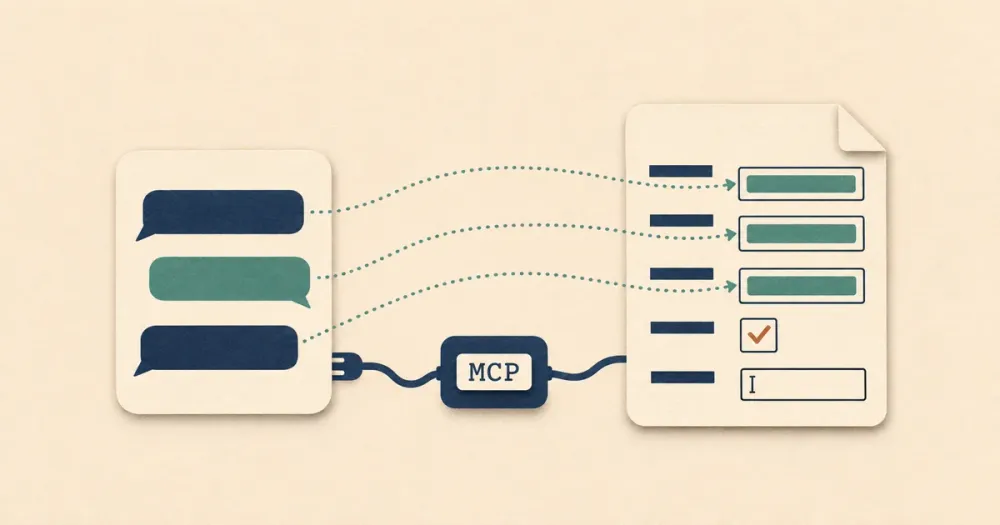
An MCP server gives an AI assistant tools it can call. With a PDF form server connected, you can ask Claude, ChatGPT or Cursor to fill in a tax form, an insurance application or a lease from details you give it, and get a filled PDF back instead of a list of answers to copy into the form yourself.
I'm the founder of DocSpring, which is the first server on this list. The sections on the others are based on their own READMEs, documentation and pricing pages as of November 2026.
Local servers and hosted servers
The servers on this list work in one of two ways, and that decides which assistants can use them.
A local server is a program that runs on your computer. Your assistant starts it, and it reads and writes PDFs on your disk. Your PDFs never leave your machine (unless the server sends them to an API), and most of these are free and open source. But only assistants that run on your computer can start one: Claude Desktop, Claude Code, Cursor, VS Code, Codex and the like. Claude in a web browser, Claude's mobile apps, ChatGPT and Microsoft Copilot can't.
A hosted server runs on the vendor's servers, and your assistant connects to its URL. It works in the browser and mobile apps as well as on the desktop, and nobody installs anything. The PDFs and the data you fill them with go to the vendor.
Then there's the form itself. A fillable PDF has form fields with names, and any of these servers can list the fields and fill them. Sometimes field names can look like gibberish and an AI agent will struggle to figure out what data should go into each field just based on their names. A flat PDF, such as a scan or a form that was printed to PDF, has no fields: something has to work out where each answer goes on the page. Only some of these servers can do that.
Comparison
| Server | Where it runs | Sign-in | Flat PDFs | Saved templates | Price |
|---|---|---|---|---|---|
| DocSpring | Hosted (US or EU) | OAuth | AI field detection | Yes | Free test PDFs, credits for live PDFs |
| JustFill | Hosted, or a local client that uploads to it | OAuth or API key | AI field detection | Yes | Free with a watermark, then $19 to $99 a month |
| iFillPDF | Hosted (EU) | OAuth or API key | AI field detection | Yes | Free with a watermark, €7.99 once to remove it |
| Fenfill | Local, the blank form is analyzed in its cloud | API key | AI field detection | Yes | API keys from $32 a month, billed yearly |
| PDFops | Hosted, or a local wrapper for its API | API key, or a keyless trial | No | No | 250 a month free, then $16 or $79 a month |
| PDF.co | Local wrapper for its cloud API | API key | Text at coordinates | No | Credits, from $8.99 a month |
| PDF Generator API | Hosted or local | A JWT you sign | Not stated | For generated documents | 14-day trial |
| pdf-mcp-server | Local, open source | None | Label detection | No | Free |
| mcp-pdf | Local, open source | None | Text at coordinates | No | Free |
1. DocSpring
DocSpring's MCP server is a hosted server. You add https://mcp.docspring.com/mcp to your assistant (or https://mcp-eu.docspring.com/mcp for an account in the EU) and sign in to DocSpring in your browser. There's no API key to copy into a config file. When you sign in, you choose whether the assistant can only read, can also create templates and fill them, or has full access, and you can disconnect it at any time. It works in Claude on the web, desktop and mobile, ChatGPT (Business, Enterprise and Edu workspaces), Microsoft Copilot, Grok, Claude Code, Codex, Cursor, VS Code and any other client that supports remote MCP servers with OAuth sign-in.
DocSpring fills a form through a template. You give the assistant the PDF, as a link or a file, and it creates a template from it. If the PDF is flat, DocSpring's AI field detection finds where the answers go and adds the fields. The assistant can look at the template's pages as images to check the fields, and fix their names, types and positions. Then it fills the template with your data and gives you a link to the PDF, and it can look at the filled pages to check that each answer landed in the right place.
You might ask:
Create a template from https://www.irs.gov/pub/irs-pdf/fw9.pdf, set up its fields, then fill it in for Acme Corp and show me the first page.
The template stays in your account. The next time, the assistant goes straight to filling it, and so can your app: the same template ID works with DocSpring's API and its SDKs, and a coding agent can generate types for the template's data with get_model_code. The assistant can also send the form to people to fill in and sign, make a batch of up to 50 PDFs in one call, combine PDFs, and create Word templates, HTML templates and page designs for documents you design yourself.
Test PDFs are free and have a watermark, and the server asks the assistant to make test PDFs unless you ask for a real document. Live PDFs use your account's credits, and so does AI field detection once the account's free pages for the month run out. DocSpring runs in the US or the EU and has a SOC 2 Type II report.
2. JustFill
JustFill is a hosted server with OAuth sign-in, and it also has a ChatGPT plugin, a Gemini CLI extension and a local Python client. The local client sends the PDF to justfill.app too, so your forms go to JustFill either way. It fills a fillable PDF's own fields, and on a flat PDF, a scan or a photo its machine learning model finds the fields and gives each one a confidence score. The assistant can review previews, add or move fields and save the result as a template. The free plan watermarks its PDFs, and the paid plans are $19, $49 and $99 a month. Its pricing page doesn't name the company that runs it.
3. iFillPDF
iFillPDF is a hosted server from BRK SAS in Paris, hosted in the EU, with OAuth sign-in or an API key. It analyzes a PDF, fills it and returns a download link, and it can save templates and put a signature image on the form. Its website says it finds the fields on scanned and flattened PDFs from the page image. It's free with a watermark, and a one-off payment of €7.99 removes the watermark. Uploads in a tool call are limited to 4 MB, or 25 MB through an upload link.
4. Fenfill
Fenfill runs on your computer (npx -y @fenfill/mcp) but splits the work. It uploads the blank form once, and Fenfill's AI finds the blanks: text, check boxes, dates, character boxes and tables. Then it fills the form on your machine, and its README says your answers and the filled PDF never go to Fenfill. On a fillable PDF it reads the fields directly. The output is a flattened PDF, and it can save templates and make a fillable copy of a flat form. Every plan gets test keys that add a TEST mark; live API keys start with the Pro plan at $32 a month, billed yearly. It's made by Larksong in Warsaw.
5. PDFops
PDFops is a low-cost server for fillable PDFs. It's hosted, or you can run a local wrapper that calls the same API, and it authenticates with an API key (or none, for a trial of 100 requests a month). Its two main tools list a form's fields and fill them, with check boxes, radio buttons and dropdowns. Its docs say it doesn't fill XFA forms or flat PDFs. A free key gives you 250 requests a month, and the paid plans are $16 and $79 a month.
6. PDF.co
PDF.co's MCP server runs on your computer, authenticates with an API key and sends your files to PDF.co's cloud API. Since there's no hosted version, it doesn't work in Claude on the web or in ChatGPT. It has 38 tools: reading and filling form fields, adding text and images at coordinates (which works on scanned PDFs), HTML to PDF, OCR and more. Output files expire after 60 minutes by default. PDF.co charges credits, with plans from $8.99 a month.
7. PDF Generator API
PDF Generator API is mainly for generating documents from templates, but its official MCP server has a fill_form_fields tool that fills a PDF's fields from a link or base64. It's hosted or local, and it authenticates with a JWT that you sign with your API key and secret, which is more setup than a sign-in or a key. It also manages templates, generates batches and converts HTML to PDF. It has a 14-day free trial.
8. pdf-mcp-server
pdf-mcp-server is an open source server (Apache-2.0) that runs on your computer, and the most complete of the local ones. It fills fillable PDFs, tries to find the fields on PDFs that don't have any by looking for their labels, and has OCR, digital signatures with your own certificate, and a tool that maps your data to the fields with an LLM. Its README says it doesn't support XFA. Install it from GitHub: the pdf-mcp package on PyPI is a different project. It uses PyMuPDF, which is AGPL licensed (its README says so), and that matters if you build it into a product.
9. mcp-pdf
mcp-pdf is another open source local server (MIT), with 52 tools for reading, editing and creating PDFs. It fills fillable PDFs from JSON, including check boxes and radio buttons, and it can draw text at coordinates on a scanned form, where you or the assistant work out the positions. It can detect an XFA form and list its fields, but it can't fill a dynamic XFA form. It also uses PyMuPDF.
Servers you'll see recommended that don't fit
AI assistants still recommend a few servers that won't fill your form:
- formfill-mcp was retired in November 2026, and its repository is archived.
- mcp_pdf_forms lists and highlights a form's fields, but it has no tool that fills them, and it hasn't changed since April 2025.
- Docusign's MCP server works with envelopes for signing, and Nutrient's extracts, converts, signs and redacts PDFs. Neither fills a PDF's form fields.
If you need XFA forms, pdf-form-filler-mcp says it fills them by editing the form's XFA data. It's a small open source project that runs on your computer.
Which one should you choose?
Use DocSpring when you'll fill the same form again, from a chat or from your app's code, when the form is flat, when people need to sign it, or when you work in Claude on the web or your phone, ChatGPT or Copilot. Test PDFs are free while you try it.
The others make sense in a few cases:
- One fillable PDF on your disk, with your data staying on your computer: pdf-mcp-server or mcp-pdf.
- Flat forms where you'd like your answers to stay on your computer: Fenfill, which uploads only the blank form.
- A hosted server in the EU with a one-off price: iFillPDF.
- The lowest price for fillable PDFs with an API key: PDFops.
- You already use PDF.co's API: PDF.co.
To try DocSpring, add https://mcp.docspring.com/mcp to your assistant and sign in. If you don't have an account yet, you can create one on the sign-in page. The setup guide has the steps for each assistant.