
PDF filling API
Upload a PDF form and DocSpring sets up its fields. Send JSON from your app and get back the filled-out PDF.
- No credit card needed
- Free test PDFs
- 9.8¢ per PDF on Starter
POST /api/v2/templates/{template_id}/submissions
{
  "data": {
    "applicant": {
      "name": "Maya Chen"
    },
    "date_of_birth": "1991-04-12",
    "monthly_income": 6200,
    "employer": "Northwind Health",
    "move_in_date": "2026-11-01",
    "monthly_rent": 2400,
    "credit_check": true
  }
}Trusted by teams in lending, insurance, property, and healthcare








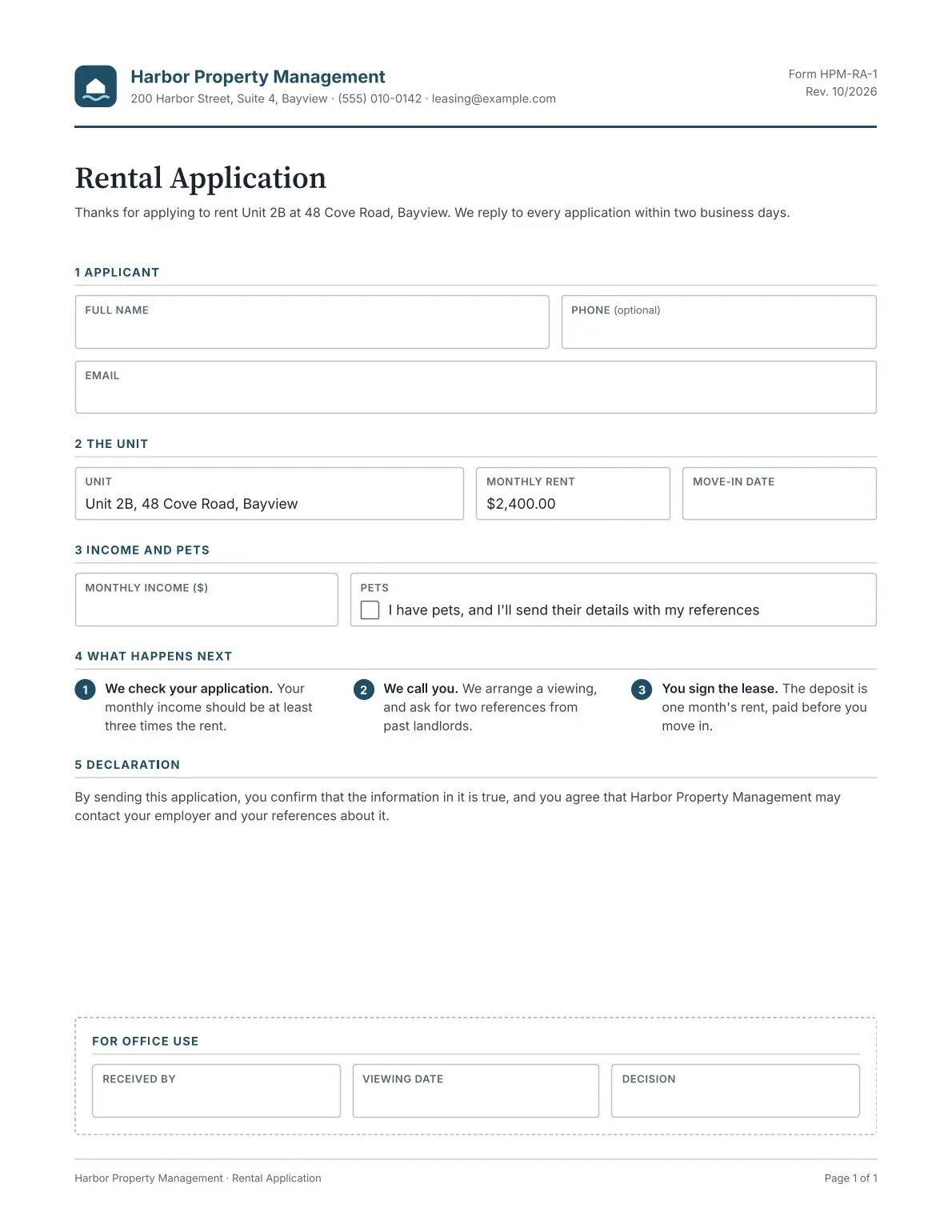
Fillable and flat PDFs
DocSpring imports the fields of a fillable PDF, and finds the boxes on a flat one. DocSpring's AI can give every field a name and a data type.
- Text boxes, checkboxes, radio buttons, and signature lines
- SSN boxes, repeated rows, and groups of options
- Review and change every field before you publish
Formatting for each field
Send plain values like "2026-11-01" or 6200. Each field prints them in the format its box needs.
- Text, numbers, dates, checkboxes, images, and signatures
- Date formats, decimal places, and one character per box
- Long text wraps, or shrinks to fit its box
Formulas and conditions
Add up totals on the form, and ask for a value only when it applies. AI can set these up when you upload the PDF.
- Formulas fill in totals from other fields
- Show, hide, or require fields based on other answers
- API requests and forms follow the same rules
Fill a PDF in a few lines of code
Send JSON from your app and get back a link to the filled PDF.
- SDKs in ten languages, or any HTTP client
- Wait for the PDF in one request, or get a webhook
- Every request is checked against the template's fields
import { Client } from 'docspring-ts'

const client = new Client()
const templateId = 'tpl_1234567890abcdef01'
const submission = await client.createSubmission(templateId, {
  data: { full_name: 'Maya Chen', monthly_income: 6200 },
})
console.log(submission.files.pdf?.download_url)
import { Client } from 'docspring'
const client = new Client()
const templateId = 'tpl_1234567890abcdef01'
const submission = await client.createSubmission(templateId, {
data: { full_name: 'Maya Chen', monthly_income: 6200 },
})
console.log(submission.files.pdf.download_url)from docspring import Client
client = Client()
data = {"full_name": "Maya Chen", "monthly_income": 6200}
submission = client.create_submission(
"tpl_1234567890abcdef01",
{"data": data},
)
print(submission.files.pdf.download_url)require 'docspring'
client = DocSpring::Client.new
submission = client.create_submission(
'tpl_1234567890abcdef01',
{ data: { full_name: 'Maya Chen', monthly_income: 6200 } }
)
puts submission.files.pdf.download_url<?php
require 'vendor/autoload.php';
$client = new DocSpring\Api\Client();
$data = ['full_name' => 'Maya Chen', 'monthly_income' => 6200];
$submission = $client->createSubmission(
'tpl_1234567890abcdef01',
['data' => $data]
);
echo $submission->getFiles()->getPdf()->getDownloadUrl() . "\n";import com.docspring.*;
public class Example {
public static void main(String[] args) throws Exception {
CreateSubmissionRequest body = new CreateSubmissionRequest()
.putDataItem("full_name", "Maya Chen")
.putDataItem("monthly_income", 6200);
Submission submission = new Client().createSubmission(
"tpl_1234567890abcdef01", body, null, null);
GeneratedFile pdf = submission.getFiles().getPdf();
System.out.println(pdf.getDownloadUrl());
}
}using DocSpring.Client.Model;
var client = DocSpring.Sdk.NewClientFromEnv();
var data = new Dictionary<string, object> {
["full_name"] = "Maya Chen",
["monthly_income"] = 6200,
};
var response = await client.CreateSubmissionAsync(
"tpl_1234567890abcdef01",
new CreateSubmissionRequest { Data = data });
var submission = response.Created();
Console.WriteLine(submission.Files.Pdf.DownloadUrl);import "github.com/docspring/docspring-go/v4"
client := docspring.NewClient("", "")
submission, _, err := client.CreateSubmission(
context.Background(), "tpl_1234567890abcdef01",
).Body(docspring.CreateSubmissionRequest{Data: map[string]any{
"full_name": "Maya Chen", "monthly_income": 6200,
}}).Execute()
if err != nil {
log.Fatal(err)
}
fmt.Println(submission.Files.Pdf.GetDownloadUrl())conn = Docspring.Connection.new()
{:ok, %Docspring.Model.Submission{} = submission} =
Docspring.Api.Client.create_submission(
conn,
"tpl_1234567890abcdef01",
%{data: %{full_name: "Maya Chen", monthly_income: 6200}}
)
IO.puts(submission.files.pdf.download_url)use docspring::models::CreateSubmissionRequest as Request;
use docspring::{Api, CreateSubmissionParams as Params};
use serde_json::{from_value, json};
let client = docspring::Client::from_env()?;
let data = json!({"full_name": "Maya Chen", "monthly_income": 6200});
let body = Request { data: from_value(data)?, ..Default::default() };
let params = Params::builder()
.template_id("tpl_1234567890abcdef01").body(body).build();
let submission = client.create_submission(params).await?;
let pdf = submission.files.pdf.and_then(|f| f.download_url);
println!("{}", pdf.unwrap_or_default());API=https://sync.api.docspring.com/api/v2
curl -s "$API/templates/tpl_1234567890abcdef01/submissions" \
-u "$DOCSPRING_TOKEN_ID:$DOCSPRING_TOKEN_SECRET" \
-H "Content-Type: application/json" \
-d '{
"data": { "full_name": "Maya Chen", "monthly_income": 6200 }
}' \
| jq -r '.files.pdf.download_url'Test PDFs are free, unlimited, and watermarked.
Features
Signature requests
Email one or more signers a link to sign the filled PDF, in order or all at once, with an audit trail.
Web forms
Every template has an automatically generated web form. Share it with a link or embed it on your site.
Batches and packets
Fill up to 50 PDFs in one request, and combine PDFs into one file.
Versions
Publish a version, so changes to the draft don't reach your integration.
Images and barcodes
Print logos, photos, signatures, QR codes, and barcodes from your data.
Embedded editor
Let your customers set up their own PDF templates inside your app.
Form library
Start from a W-9, W-4, I-9, or another common form, already set up.
Your own storage
Save every filled PDF to your own S3 bucket, Google Drive, Dropbox, or Box.
DocSpring has been great! We had to do a lot more PDF template iterations than we originally planned, and being able to do those from your interface was a lifesaver. When a PDF fails because we didn’t send the right payload, the detailed error messages you provide have been very helpful.

Questions about filling PDFs
Read the template editor guideWhat is a PDF filling API?
An API that fills in PDF forms with your data. You upload a PDF to DocSpring once, and DocSpring finds its fields and names them. Then your app sends the data as JSON whenever it needs a filled PDF, and gets back a link to download it.
Can I fill flat PDFs that have no form fields?
Yes. DocSpring imports the form fields of a fillable PDF, and finds the fields on a flat one. You can add, move, and resize fields in the template editor, so any box on the page can be filled.
Does DocSpring check the data I send?
Yes. Every template has a JSON schema made from its fields. DocSpring checks each request against it before it fills the PDF, so a missing value or a wrong type returns a clear error instead of a wrong document.
How many PDFs can I fill at once?
Wait for one PDF in a single request, fill up to 50 PDFs in one batch request, or create PDFs in the background and get a webhook when each one is ready. Test PDFs are free and unlimited.
Can people sign the filled PDFs?
Yes. Send a signature request: DocSpring emails each signer a link, they fill in their own fields and sign, and the signed PDF comes with an audit trail.
Is DocSpring secure enough for financial, insurance, and healthcare documents?
DocSpring is SOC 2 Type II audited and HIPAA compliant, and keeps your documents in the US or the EU. We sign a BAA on every paid plan: contact support@docspring.com before you send protected health information. Enterprise customers can also run DocSpring on their own servers.
How much does a filled PDF cost?
A filled PDF of up to 10 pages costs 9.8¢ on the Starter plan, and less on bigger plans. Longer PDFs, very large files, and long processing cost more. Test PDFs are free and watermarked.
Compare PDF filling APIs
Field setup, forms, signing, and pricing, side by side.
Turn your PDF forms into templates
Test PDFs are free and unlimited, and the free plan makes 10 live PDFs a month. No credit card needed.