
I migrated DocSpring from Heroku to AWS in 2018. (It was still called FormAPI back then.) We were given some free AWS credits, and I wanted to use them without having to build a deployment platform myself. Convox gave me a working platform out of the box: describe the application, deploy it, and get back to building the product.
Convox is convention over configuration for infrastructure. I started with a platform I could use before I understood all of its implementation. I learned from that implementation, took over more of the Terraform configuration, and adapted it to our requirements while keeping the application workflow.
Here's a Hacker News comment I wrote in July 2018 about the move. I was enthusiastic about rolling deployments and being able to use our AWS credits. Since then, our infrastructure has moved from ECS to Kubernetes, we've built out our own security and compliance controls, and we've added our own access layer.
Convox was founded by David Dollar, Noah Zoschke and Matt Manning, who all came from Heroku. So Convox might feel very familiar if you've already used Heroku. Convox calls an installation of the platform a rack. The open-source rack is Apache-2.0 licensed, runs in your cloud account, and has a documented CLI installation path. The separate Convox Console adds a web interface and team workflows, with free and paid plans. You can use the rack independently.
Today, our team runs a production rack in the US, another in the EU, and a staging rack. We also help maintain Convox racks for some of our Enterprise customers.
What an ordinary deployment looks like
For a Rails application, you will usually need a web process and a background worker, and some scheduled commands. Convox lets you describe those in convox.yml.
This simplified configuration assumes an existing Rails app with a Dockerfile, Sidekiq, a health endpoint at /up, and a reports:daily rake task. Its database and Redis are provisioned separately:
environment:
  - RAILS_ENV=production
  - SECRET_KEY_BASE
  - DATABASE_URL
  - REDIS_URL

services:
  web:
    build: .
    command: bundle exec rails server -b 0.0.0.0 -p 3000
    port: 3000
    health: /up
    scale:
      count: 2
  worker:
    build: .
    command: bundle exec sidekiq

timers:
  daily-report:
    schedule: "0 3 * * *"
    service: worker
    command: bundle exec rake reports:daily
This config declares two web processes and a worker. The timer starts a separate process using the worker service's configuration at 03:00 UTC. Environment entries without defaults must be supplied through the app's configuration; their values stay out of this file.
The CLI remembers your selected rack and picks the app from your current directory:
convox deploy
convox logs
convox run web bundle exec rails console
The first command builds the containers, creates a release pairing the build with the app's environment variables, and promotes it through a rolling deployment. New processes start and pass health checks as the old ones are replaced. Startup or health-check failures can cause the rollout to reverse to the previous release. The other commands let you follow the application's logs and start a Rails console.
The convox.yml manifest also handles custom domains, resource limits and autoscaling, and Convox manages Let's Encrypt certificates. Its resources can provision databases and caches: postgres runs in a container, while rds-postgres creates an AWS-managed database. You can also connect to databases you manage separately.
Growing into Terraform
I didn't have a lot of experience with AWS or DevOps when I first started. I've learned a great deal by studying Convox and figuring out how to modify and extend it.
Convox v2 used CloudFormation and Amazon ECS. In February 2020, Convox announced its Kubernetes-based multi-cloud platform, installed through Terraform. On AWS, v3 uses EKS, Amazon's managed Kubernetes service. It also supports Google Cloud, Azure and DigitalOcean.
I started managing our rack Terraform directly when I wanted to add CloudWatch configuration and customize certificate DNS validation. I also wanted our database and storage infrastructure managed in the same place. Starting with Convox meant I could make those changes around an application platform that was already working.
Convox's AWS system module brings together the cluster, rack API and logging. Its cluster module manages networking and EKS. Nodes run in private subnets behind NAT gateways by default; management endpoints have separate access settings.
You can use those modules from your own infrastructure repository. This excerpt pins the module and rack release together and chooses the Contour ingress controller for a new rack:
module "rack" {
  source = "git::https://github.com/convox/convox.git//terraform/system/aws?ref=3.26.0"

  name        = "example-staging"
  region      = "us-east-1"
  release     = "3.26.0"
  private     = true
  router_type = "contour"
}
The examples use Convox 3.26.0. Our deployment currently uses a customized 3.25.14 base. A complete Terraform setup will also need credentials, state storage and access configuration.
I eventually wrote quite a lot of my own custom Terraform. By then I understood much more of what I was changing, and I still had Convox's builds, releases and application API underneath our workflow. (I also use Terraform to manage everything in Cloudflare, Tailscale, CircleCI, all of our monitoring tools, and many other things.)
Our access controls
Our SOC 2 work brought requirements for individual permissions, approval of sensitive operations, and evidence of what happened. We chose to build Rack Gateway, an independent proxy for the Convox API, and make it accessible through our private Tailscale network. Those are additions for our own workflow; a new Convox rack doesn't require them. The official Convox Console offers its own team-access and audit features, depending on the plan.
Rack Gateway now handles security-key approval for agent commands and deployments. I can review the Ruby an agent wants to run, and our command configuration uses a read-only database user by default. Deploy approvals release the matching CircleCI hold. Our Rack Gateway post goes into more detail about the implementation and audit trail.
Convox's API let us add those controls while keeping its deployment system. They support our SOC 2 program alongside our policies and operational procedures.
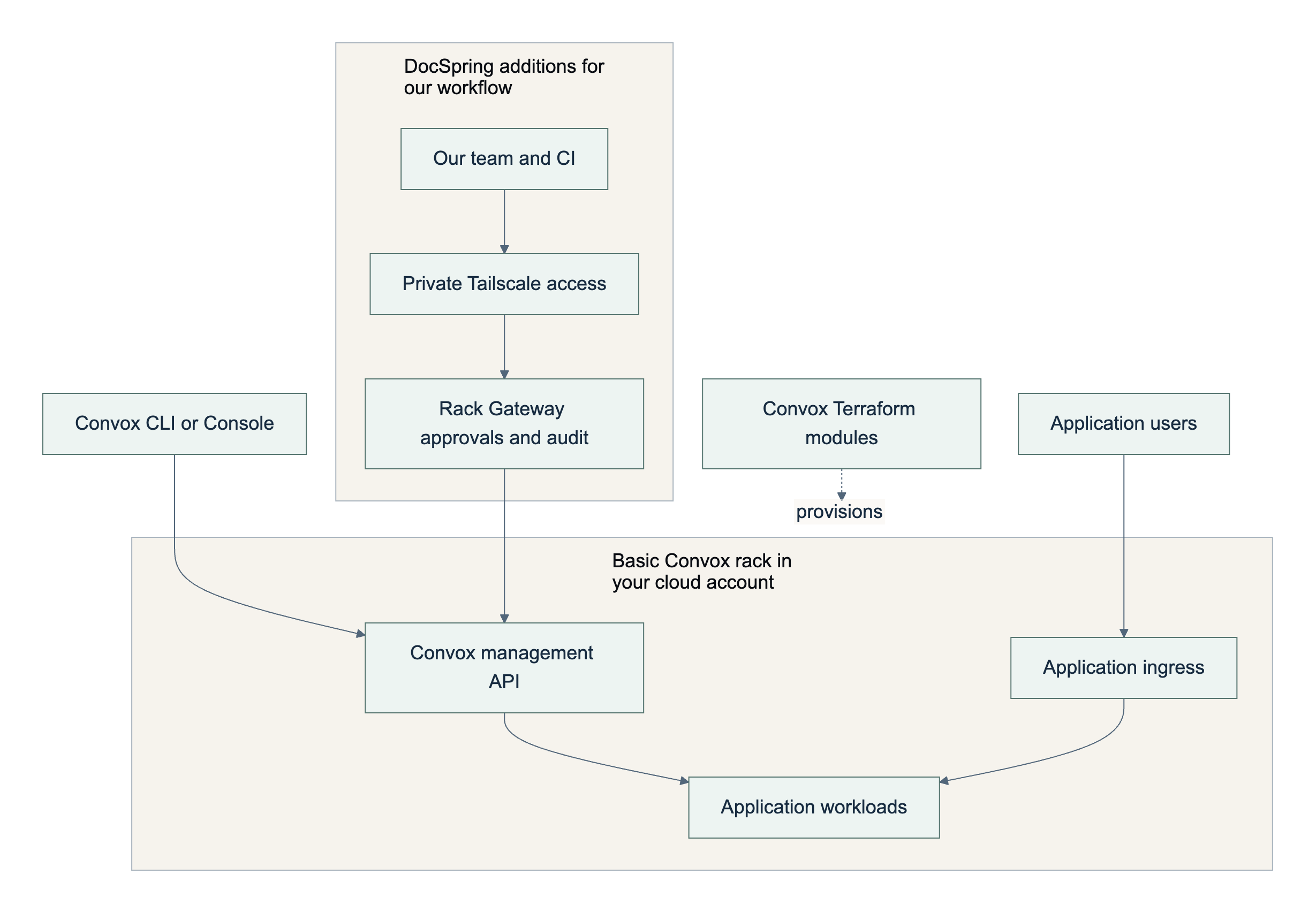
The top path shows the standard management interface. In DocSpring's setup, management requests go through our gateway, and we restrict direct access to the rack API. Application traffic goes through the ingress in either case.
What we still maintain
Managing your own infrastructure comes with a lot of responsibility. We own the upgrade schedule, monitoring, backups and restore testing, along with our Terraform customizations. Larger projects, such as replacing an ingress controller, are separate from the day-to-day work of deploying and operating the application.
Lately, tightening our security and compliance position has involved substantial work: Redis TLS, protecting backups and audit logs from deletion, retaining useful incident logs, and changing network access controls.
Replacing ingress-nginx was another substantial job. The upstream project retired in March 2026. Convox ships its own build and already supports Contour/Envoy, but its documented switching procedure takes apps offline until they're redeployed. We built a zero-downtime transition in our fork and used it to move our racks to Contour.
The transition had to account for connections that Cloudflare kept open to nginx, even after new connections were going to Envoy. We waited for nginx's access log to go quiet before removing the old routes. We also added Envoy access-log collection and redaction, and fixed two certificate-handling bugs. Those changes are in our fork, and we've offered them upstream.
Convox is actively releasing updates: 3.26.0 came out on November 5. When I submitted a fix for how rolling deployments spread pods across zones, a maintainer replied that they were including it in 3.25.14. I can contribute a fix when I need one, but I also have to maintain it while it's specific to our setup.
What a three-AZ AWS rack costs
Running a Convox rack in your own AWS account comes with an AWS bill, and it can be a lot higher than running your application on a VPS, especially when using a cheap provider like Hetzner. Here is an illustrative estimate for one configuration, using US East (N. Virginia) pricing.
Multiple small applications can share a rack while capacity allows, spreading its fixed costs across those apps. This configuration uses three availability zones, private nodes and a public router:
| Component | Example calculation | Monthly cost (USD) |
|---|---|---|
| EKS control plane, standard version support | 1 × $0.10/hour | $73.00 |
| NAT gateways | 3 × $0.045/hour | $98.55 |
| Network Load Balancer, fixed charge | 1 × $0.0225/hour | $16.43 |
| Public IPv4 addresses for NAT and the router | 6 × $0.005/hour | $21.90 |
Linux t3.medium worker nodes |
3 × $0.0418/hour | $91.54 |
| Node boot disks, gp3 at baseline performance | 3 × 20 GiB × $0.08/GiB-month | $4.80 |
| Subtotal before usage charges and databases | About $306/month |
Sources: AWS's EKS, NAT and IPv4, load balancer, T3 and gp3 pricing.
About $210 of that is the control plane and fixed networking charges. The workers host both Convox's services and your application; the remaining capacity is what you can use for workloads. Add databases, backups, image storage, logging, traffic charges, load-balancer capacity charges and any burst CPU charges separately. Autoscaling can also add nodes. EKS extended-version support costs more than standard support, which is a good reason to keep Convox up to date and use the latest supported Kubernetes version.
A separate staging rack has its own baseline costs. A hosted platform is often a better starting point when you don't need to control the cloud account.
Would I choose it today?
I'd choose Convox again for a team that wants Heroku-style deployments in its own cloud account, with infrastructure it can customize as requirements grow. The open-source rack and its Terraform modules give you a foundation you can inspect and extend. Convox is what we recommend for our Enterprise on-premises installations, although our customers are free to run DocSpring's Docker image however they like.
Our security and compliance work is one example of that growth. For teams with strict SOC 2 or HIPAA requirements, Aptible is another solid option I'd consider. Familiarity is part of my preference for Convox: I know how it works and where to make changes, and our operational experience is on AWS.
Try it as an experiment
I'd start with Convox's Apache httpd example, so your first experiment doesn't need a database or real application data. Use a sandbox AWS account, the AWS CLI, Terraform and the Convox CLI. Follow the credentials and permissions setup in the CLI installation guide, then install a dedicated rack:
convox rack install aws convox-evaluation --version 3.26.0 \
  region=us-east-1 node_type=t3.medium private=true \
  high_availability=true router_type=contour

convox switch convox-evaluation
git clone https://github.com/convox-examples/httpd.git example-httpd
cd example-httpd
git checkout c37afd4a6f7c799f044b71ff895ef81d592dd46b
convox apps create
convox deploy
convox services
convox logs
It takes about 5-20 minutes to provision a rack, depending on the provider; allow additional time for setup, deploying and cleanup. Using the configuration above, four hours is roughly $2 in fixed charges before usage. I'd budget $10 for a short evaluation and check the bill afterwards.
When finished, remove the sample app and the dedicated rack:
convox apps delete example-httpd
convox rack uninstall convox-evaluation
Wait for deletion to finish and check for retained AWS resources, including storage and logs.
That experiment should tell you whether you like the daily workflow. Eight years ago, that was enough to get me started. Having the implementation available to study and extend is why we're still using it.