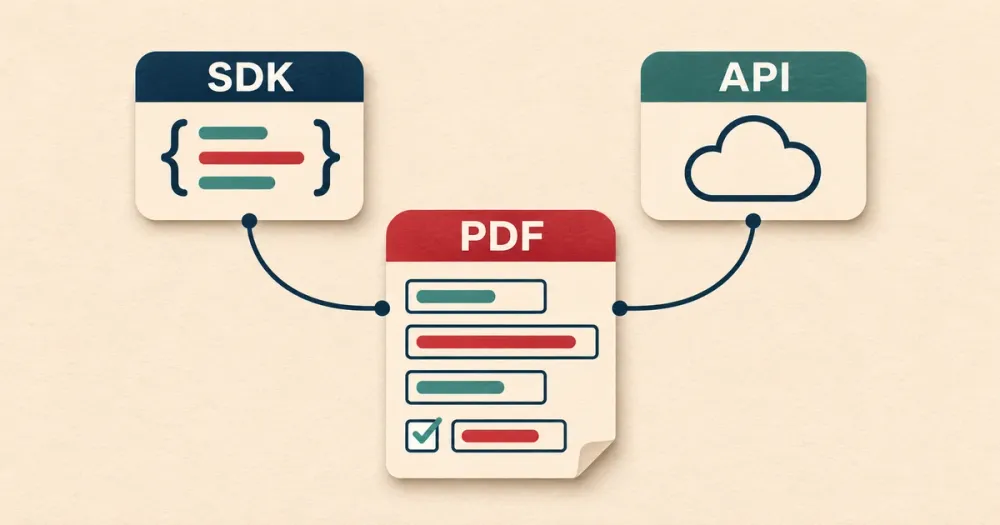
If you need your app to fill in PDF forms, you can either do it yourself with a PDF library, or send your data to a hosted API that fills the PDF for you.
"SDK" can mean either one. A PDF library like pdf-lib is an SDK that reads and writes the PDF inside your own app. DocSpring's API clients are also SDKs, but they just send your data to DocSpring, and the PDF is filled on our servers. When you compare options, find out where the PDF is actually filled.
I'm the founder of DocSpring, so I'm biased. I'll show you what the library approach looks like first, because for some apps it's all you need.
Filling a PDF with a library
If your PDF already has form fields, a library can fill them by name. This example uses pdf-lib to fill a text field called reference and a checkbox called approved:
import { readFile, writeFile } from 'node:fs/promises'
import { PDFDocument } from 'pdf-lib'

const pdf = await PDFDocument.load(await readFile('template.pdf'))
const form = pdf.getForm()

form.getTextField('reference').setText('EXAMPLE-001')
form.getCheckBox('approved').check()

await writeFile('filled.pdf', await pdf.save())
Install [email protected], save this as fill.mjs, and run it with Node. I tested it with a PDF containing those two fields.
That's the whole thing. If you have one or two fillable PDFs that never change, and the values are plain English text, you can stop here.
Where a library starts to cost you time
Here's what you'll have to deal with as you go.
Names with non-English characters. pdf-lib uses a standard PDF font by default, and that font only covers Western European characters. "José Müller" worked. "Łukasz Żółć" failed with WinAnsi cannot encode "Ł", and a Chinese name failed the same way. To fix it, you embed your own font using fontkit, and make sure that font covers every language your users might type.
Flattening. Flattening turns the filled fields into part of the page, so the values can't be edited in a PDF viewer. pdf-lib has a flatten() method. When I flattened my test PDF, the result looked fine in a viewer, but Poppler reported Invalid XRef entry errors because the file still referred to objects that had been removed. Some readers will cope with that and some won't.
Flat PDFs. Many forms don't have any fields at all. The boxes are just lines drawn on the page. A library can't fill those by name, so you have to work out the x and y coordinates of every box and draw the text yourself. You can check whether a PDF has fields with our free PDF debugger.
Forms change. Government and insurance forms get new editions. When a box moves, or a field is renamed, you have to update your code and deploy it.
Maintenance. pdf-lib's last release was in May 2022, and its GitHub repository has more than 300 open issues. It's still widely used, but you shouldn't count on a fix if you hit a bug.
Filling a PDF with DocSpring
With DocSpring, you upload your PDF once and it becomes a template. If the PDF has form fields, we import them. If it's flat, we detect the fields for you, and AI gives each field a readable name like first_name instead of topmostSubform[0].Page1[0].f1_01[0]. You can check and adjust everything in the template editor.
Then your app sends JSON:
curl -X POST "https://sync.api.docspring.com/api/v2/templates/$TEMPLATE_ID/submissions" \
  -u "$API_TOKEN_ID:$API_TOKEN_SECRET" \
  -H "Content-Type: application/json" \
  -d '{"test": true, "data": {"first_name": "Jane", "last_name": "Doe"}}'
The response includes a link to the filled PDF. This is how DocSpring handles the problems above:
- PDFs are flattened by default. You can keep text and checkbox fields editable if you need to.
- Flat PDFs work the same way as fillable ones, because the fields are part of the template.
- Templates are versioned. When a form changes, you update the template in the editor and publish a new version. Your code doesn't change, and requests can stay on an older version until you're ready.
- Right-to-left languages like Arabic and Hebrew are supported.
We have official API clients for C#, Elixir, Go, Java, JavaScript, PHP, Python, Ruby, Rust and TypeScript, plus a command-line tool. There's also an MCP server, so you can ask Claude, ChatGPT or another AI assistant to set up a template and fill it for you.
Test PDFs are free on every plan. They have a watermark, so you can build and test your whole integration before you pay anything.
Which one should you use?
Use a library if you have a small number of fillable PDFs that rarely change, you don't need to flatten them, and your users only type Western European characters.
Use DocSpring if any of these are true:
- Some of your PDFs are flat.
- You have more than a few forms, or they change every year.
- You need flattened PDFs that open cleanly in every viewer.
- Your users have names in other languages.
- Someone who isn't a developer needs to update the forms.
If you're comparing hosted APIs, I wrote about the best PDF form filling APIs too.
You can create a free DocSpring account, upload one of your forms, and fill it with test data in a few minutes.