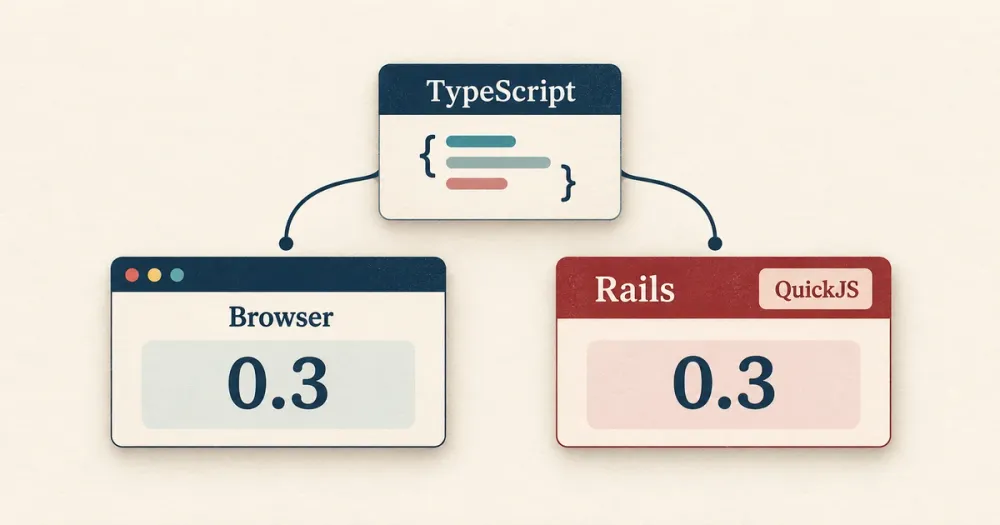
We wanted calculations in DocSpring's browser forms to match the values Rails writes into generated PDFs. Maintaining separate JavaScript and Ruby implementations meant that every change to a formula rule had to be made twice.
We moved those rules into a shared TypeScript engine. The browser imports it normally. Rails runs a JavaScript bundle built from the same source inside QuickJS, an embeddable JavaScript engine.
This guide builds a small version of that setup: a line-total calculation that runs in a browser form and in Ruby. It needs no running Node server or HTTP request between the two runtimes. After the example, I'll cover the less obvious parts of our implementation: decimal values, blank fields, errors, and tests.
1. Write the calculation once
You'll need Node.js and npm for the build, plus Ruby 3.2 or later, Bundler, and a C compiler for the QuickJS gem. The example below was tested with Node 22.6.0, Ruby 4.0.9, and quickjs 0.22.0.
Start in an empty directory:
mkdir quickjs-shared-calculation
cd quickjs-shared-calculation
mkdir src
Create package.json with the pinned dependencies:
{
  "private": true,
  "dependencies": {
    "decimal.js": "10.6.0"
  },
  "devDependencies": {
    "esbuild": "0.28.2"
  }
}
Install them with npm install, then create src/pricing.ts:
import Decimal from 'decimal.js'

const D = Decimal.clone({ precision: 40, rounding: Decimal.ROUND_HALF_UP })
const decimalText = /^[+-]?(?:\d+(?:\.\d*)?|\.\d+)(?:e[+-]?\d+)?$/i

function decimal(value: unknown, name: string): Decimal {
  if (typeof value !== 'string' || !decimalText.test(value.trim())) {
    throw new Error(`${name} must be a decimal string`)
  }
  const number = new D(value.trim())
  if (!number.isFinite()) throw new Error(`${name} must be finite`)
  return number
}

export function calculate(input: unknown) {
  if (typeof input !== 'object' || input === null || Array.isArray(input)) {
    throw new Error('Expected an object with unitPrice and quantity')
  }
  const fields = input as Record<string, unknown>
  const total = decimal(fields.unitPrice, 'unitPrice')
    .times(decimal(fields.quantity, 'quantity'))
  if (!total.isFinite()) throw new Error('The total must be finite')
  return { type: 'decimal', value: total.toString() }
}

export function calculateJSON(json: string): string {
  return JSON.stringify(calculate(JSON.parse(json)))
}
The module has no browser or Rails dependencies. calculate accepts an object and returns a tagged decimal value; calculateJSON exposes the same operation through JSON text for Ruby.
Both inputs are strings. That lets decimal.js read the decimal value before JavaScript's binary floating-point numbers can round it. The example uses 40 significant digits and half-up rounding for arithmetic. That is an explicit precision policy, not unlimited precision or a complete currency policy. Currency scale and display formatting still need their own rules.
The validation accepts zero, signed values, fractional quantities, and scientific notation. Missing, blank, and non-finite inputs produce errors. In particular, an empty price never quietly becomes zero.
2. Build a bundle both runtimes can load
Build the module and its dependency into one file:
npx esbuild 'src/pricing.ts' --bundle --format='iife' \
  --global-name='pricing' --platform='neutral' --target='es2020' \
  --outfile='dist/pricing.js'
The IIFE format and global name expose the exports as pricing.calculate and pricing.calculateJSON. platform=neutral avoids assuming a Node or browser environment. The code still needs to stay independent of platform-specific APIs; a build option can't make DOM calls work in QuickJS.
This command transpiles TypeScript without type-checking it. Use your project's TypeScript check separately. Our application uses webpack for the server bundle, but esbuild keeps this standalone example small.
Create index.html beside the dist directory:
<!doctype html>
<html lang="en">
<meta charset="utf-8">
<meta name="viewport" content="width=device-width,initial-scale=1">
<title>Shared TypeScript calculation</title>
<style>
  body { max-width: 38rem; margin: 4rem auto; padding: 0 1rem; font: 18px system-ui; color: #183247; }
  label { display: block; margin: 1rem 0; }
  input { font: inherit; padding: .4rem; max-width: 15rem; }
  output { display: block; padding: 1rem; background: #eef5f3; }
</style>
<h1>Line total</h1>
<form id="calculator">
  <label>Unit price <input id="unit-price" value="0.10" inputmode="decimal"></label>
  <label>Quantity <input id="quantity" value="3" inputmode="decimal"></label>
</form>
<output id="result" aria-live="polite"></output>
<script src="dist/pricing.js"></script>
<script>
  const form = document.querySelector('#calculator')
  const output = document.querySelector('#result')
  function update() {
    try {
      const result = pricing.calculate({
        unitPrice: document.querySelector('#unit-price').value,
        quantity: document.querySelector('#quantity').value,
      })
      output.textContent = result.value
    } catch (error) {
      output.textContent = error.message
    }
  }
  form.addEventListener('submit', event => event.preventDefault())
  form.addEventListener('input', update)
  update()
</script>
</html>
Open index.html in a browser. Its local script calculates as you type; the initial values produce 0.3. The form keeps the input text as strings and uses textContent to display either the result or a validation error.
3. Load the same bundle in Ruby
Create a Gemfile:
source 'https://rubygems.org'

gem 'quickjs', '0.22.0'
The QuickJS Ruby gem provides a compiled bundle and a VM API. Create pricing.rb beside index.html:
require 'json'
require 'quickjs'

module Pricing
  BUNDLE = Quickjs.compile(
    File.read(File.join(__dir__, 'dist/pricing.js')),
    filename: 'pricing.js'
  )

  def self.calculate(input)
    vm = Quickjs::VM.new(timeout_msec: 2_000, memory_limit: 64 * 1024 * 1024)
    begin
      BUNDLE.run(on: vm)
      JSON.parse(vm.call('pricing.calculateJSON', JSON.generate(input)))
    ensure
      vm.dispose!
    end
  end
end

if $PROGRAM_NAME == __FILE__
  puts JSON.pretty_generate(Pricing.calculate(unitPrice: '0.10', quantity: '3'))
end
Run it from the project directory:
bundle install
bundle exec ruby pricing.rb
The output is:
{
  "type": "decimal",
  "value": "0.3"
}
Quickjs.compile runs once when Ruby loads the file. Each calculation creates a fresh VM, runs the compiled bundle, and passes JSON text to the exported function. ensure disposes of the VM even when evaluation raises an error.
The fresh VM keeps JavaScript globals from carrying state into the next calculation. The two-second timeout and 64 MiB memory limit bound evaluation resources. QuickJS is running our own bundled code here; those limits aren't a reason to start evaluating arbitrary JavaScript supplied by users.
Rebuild after changing the TypeScript and restart any Ruby process that has already loaded Pricing. This small wrapper deliberately keeps its compiled bundle for the life of the loaded module.
4. Use it from Rails
In a Rails application, the wrapper can live in app/services/pricing.rb. Assuming the build still writes to dist/pricing.js at the application root, replace the BUNDLE assignment with:
BUNDLE = Quickjs.compile(
  Rails.root.join('dist/pricing.js').read,
  filename: 'pricing.js'
)
Add quickjs to the application's Gemfile, include the TypeScript dependency in its build, and make sure the generated bundle reaches the deployed application. Build it before any Rails process needs to load the service. Commit the source and dependency lockfiles; produce the bundle in CI.
Your controller or job calls Pricing.calculate with the submitted inputs. Recalculate on the server even if the browser already displayed a total. The browser's result is useful feedback, but it isn't authoritative input for the generated document.
The result stays a decimal string across the boundary. Use a decimal-aware Ruby or database type when storing it; calling to_f would throw away the reason for preserving the string. Map expected validation errors to your application's input errors, and report unexpected runtime failures without generating a document with a missing total.
Our production wrapper adds application-specific error handling and a development check for missing or stale bundles. It also picks up a rebuilt bundle without restarting Rails. Those checks matter: otherwise, a source change can appear to work in the browser while Rails still executes yesterday's JavaScript.
The number contract matters as much as the shared code
The example calculates 0.10 × 3 and returns 0.3. It doesn't preserve the input's display scale, so it won't automatically format that result as 0.30.
DocSpring's PDF template formulas need more than a line-total function. A template can refer to other fields, calculate intermediate values, and use those results in later formulas. We also preserve numeric distinctions that affect document formatting: 2 and 2.0 can be observably different.
Our internal Ruby boundary tags integers and decimals with their string representation. An integer can enter as:
{ "integer": "9007199254740993" }A decimal can enter as:
{ "decimal": "2.0" }These are DocSpring's internal input tags, separate from the small example's unitPrice and quantity interface. The engine returns tagged values that Ruby reconstructs into the appropriate numeric types.
Strings preserve an integer beyond JavaScript's safe integer range. They don't recover precision that was already lost: turning a rounded float into a string is too late. Our existing templates also accept floating-point inputs, so the adapter has a defined conversion policy for those values. Both callers need to follow that policy.
Preserve blanks, failures, and field references
Sharing arithmetic alone would have left us with plenty of ways to disagree.
A missing field, an explicitly blank field, and a supplied zero can have different meanings. Before someone fills in a form, a calculated total may need to stay blank. Once a calculation has an input, other empty fields may contribute zero or a configured default. An explicitly supplied value for the calculated field needs different handling from an omitted value.
The Ruby adapter leaves a field's value property absent when the submission omits it and sends null for an explicitly blank value. Older templates have a compatibility option for the previous treatment of unset numbers. That option travels with the input so both runtimes apply the same rule.
Failures need a shared meaning too. A formula can fail directly or depend on another formula that failed. Our result separates those cases into errors and failed, alongside the calculated values. A dependent calculation mustn't turn an upstream error into a plausible-looking zero.
The shared module also parses field references, updates them when fields are renamed, and checks for invalid references and cycles. Our template paths use slashes, while formulas can use references such as items[0].price. Leaving that interpretation in separate adapters would reintroduce the disagreement we were trying to remove.
Customer formulas go through our formula parser and its supported operators and functions. QuickJS executes that parser and evaluator. We don't pass customer formulas to JavaScript's eval.
Test the same expectations in both runtimes
For the standalone example, useful cases include 0.10 × 3, zero, fractional quantities, and a decimal beyond JavaScript's safe integer range. We also check missing values, blank strings, invalid numeric text, and recovery after an error.
Here is a small Ruby check you can save as check.rb beside pricing.rb and run with bundle exec ruby check.rb:
require_relative 'pricing'

[
  ['0.10', '3', '0.3'],
  ['0', '3', '0'],
  ['2.50', '1.5', '3.75'],
  ['9007199254740993.01', '2', '18014398509481986.02']
].each do |price, quantity, expected|
  actual = Pricing.calculate(unitPrice: price, quantity: quantity)
  raise "Unexpected result: #{actual.inspect}" unless actual == {
    'type' => 'decimal', 'value' => expected
  }
end

puts 'All four calculations passed'
Keep a common fixture file when you add the JavaScript tests, so both runtimes get identical inputs and expected outputs. The standalone example's 16 shared cases passed in Node and Ruby's QuickJS; Node also passed a malformed-JSON check. These are engine tests, not browser UI tests.
In DocSpring, conformance fixtures cover calculations, template problems, field references, and renaming. For this article, the current TypeScript conformance suite passed all 294 cases in Jest. The Ruby formula and field dependency parity specs passed all 433 examples against the freshly built server bundle.
Our application's fixture generator obtains expected outputs from the engine itself, which limits what those tests can establish. Once reviewed and checked in, they can catch regressions and differences between runtimes. Regenerating them from a faulty implementation and accepting the diff would preserve the fault.
Expected-output changes still need an independent reason. For simple arithmetic, calculate the answer separately. For compatibility behavior, check the product rule and the behavior existing templates rely on. Agreement between two runtimes doesn't establish that either result is what we intended.
Where we use it now
We've since applied the same approach to field dependencies: the rules that show, hide, or require fields based on other values. The visual form, template editor, simple form, and Rails now use the shared TypeScript engine. Rails uses it when generating conditional validation rules and deciding which fields to omit from PDF or HTML output.
That hasn't unified every form rule. Field conditions for checkmarks and shapes still have separate TypeScript and Ruby implementations with parity fixtures.
We still test the callers and the serialization boundary. A shared bug can affect both runtimes. But a change to formula behavior now has one implementation to update, and field dependency rules have the same arrangement. In our investigation of agent-assisted development, we looked at which code-quality improvements make ongoing changes easier. This is one of them: an agent fixing a formula has a defined module to change and a contract to test, without having to rediscover another implementation.