

Template Editor Introduction
The template editor is where you upload your PDF templates and configure form fields. This powerful tool allows you to transform static PDFs into dynamic, data-filled documents.
If you need any help getting started, please contact us.
Template Editor Overview
Section titled “Template Editor Overview”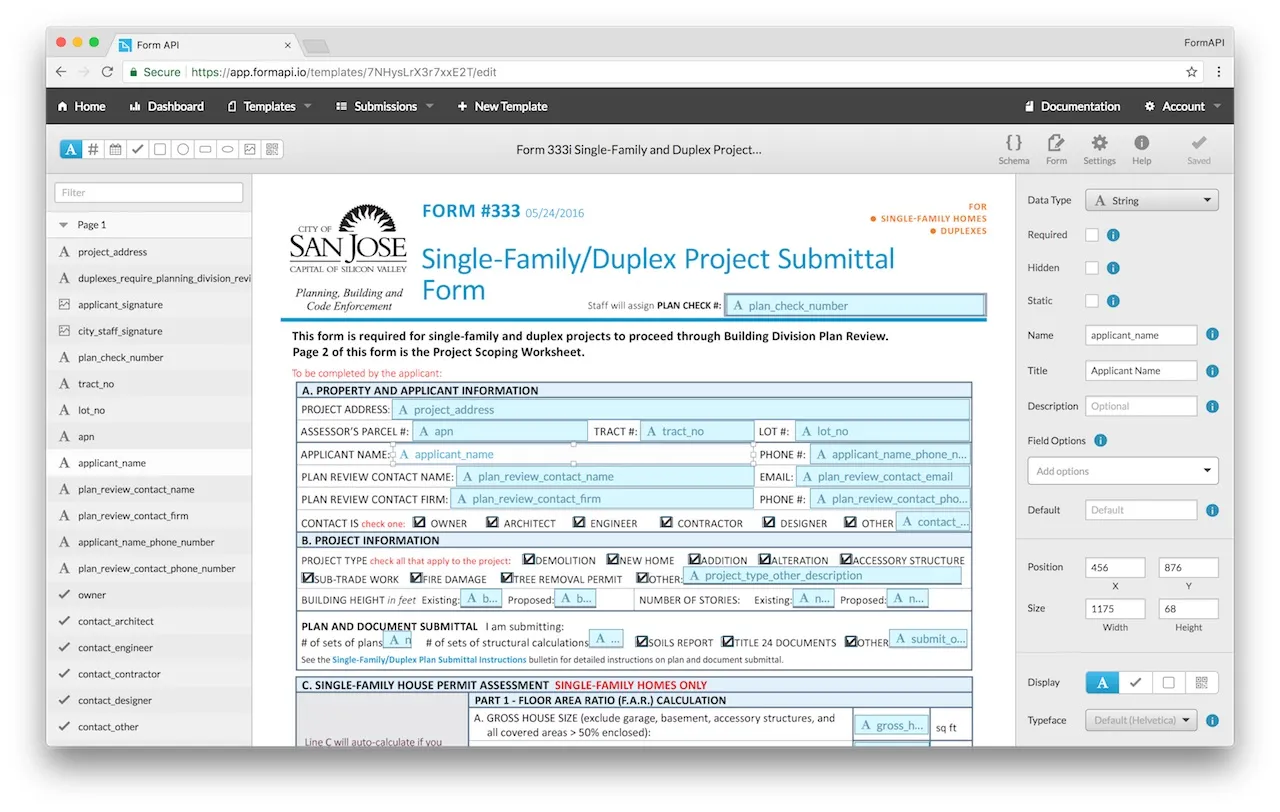
Getting Started
Section titled “Getting Started”When uploading a PDF form, DocSpring can automatically detect fields and suggest names and data types.
Add a Field
Section titled “Add a Field”Add a new field by clicking and dragging on the template:

You can change the type of new fields by clicking one of the options in the header:

You can also change the type of new fields by using their keyboard shortcuts.
Delete a Field
Section titled “Delete a Field”To delete a field, you can press Backspace or Delete while the field is selected.

You can also hover over the field in the sidebar, and click the Trash icon:
Next Steps
Section titled “Next Steps”Once you’re comfortable with the basics, explore these topics: